
Relaunch resume
Waiting chats are stored in pending.json. On the next launch they are restored and resumed once the route is ready.
OpenDeath is one desktop app with two jobs: give you a serious workspace, and keep the route healthy while you use it. Here is the whole surface.
Switch modes from the deck. Each route has its own setup, status, and recovery path, so a failed tunnel never means a failed session.
| Mode | What it uses | Setup |
|---|---|---|
| Auto | Picks a healthy route from the configured modes | None |
| WARP | Cloudflare WARP client | Install WARP |
| Tor | Bundled Tor Expert Bundle | Included |
| HTTP Proxy | One proxy or a rotating host:port list | Paste a list or URL |
| SOCKS5 | Local or remote SOCKS5 server | Enter host and port |
| Route64 | IPv6 route rotation helpers | Import a route list |
| Mullvad | Mullvad VPN desktop client | Install and sign in |
| Windscribe | Windscribe desktop client | Install and sign in |
| None | Direct connection | None |
The recovery layer watches for a free limit, changes the exit, and resumes the chats that are waiting. It does this without closing the workspace.
The event stream reports a provider free limit for a live chat.
OpenDeath probes candidate exits and avoids IPs it has already burned.
The new route must answer before anything is sent to the provider.
Every waiting chat receives continue in parallel, with duplicate protection.
Waiting chats are stored in pending.json. On the next launch they are restored and resumed once the route is ready.
A short per-chat delay plus a rotation lock prevents the same limit from being answered twice.
The deck reports what happened, how many chats were updated, and what is left for you to send.
Sessions, tabs, diffs, a terminal, a browser, and dictation. The network deck sits under the title bar where it belongs.
Keep several threads open, switch without losing scroll position, and reopen a closed tab from the strip.
Review file changes beside the conversation and run commands in a real terminal pane.
Open a page, inspect it, and bring what you find back into the session without a second app.
Speak a prompt when typing is slower. Dictation is available anywhere the composer is.
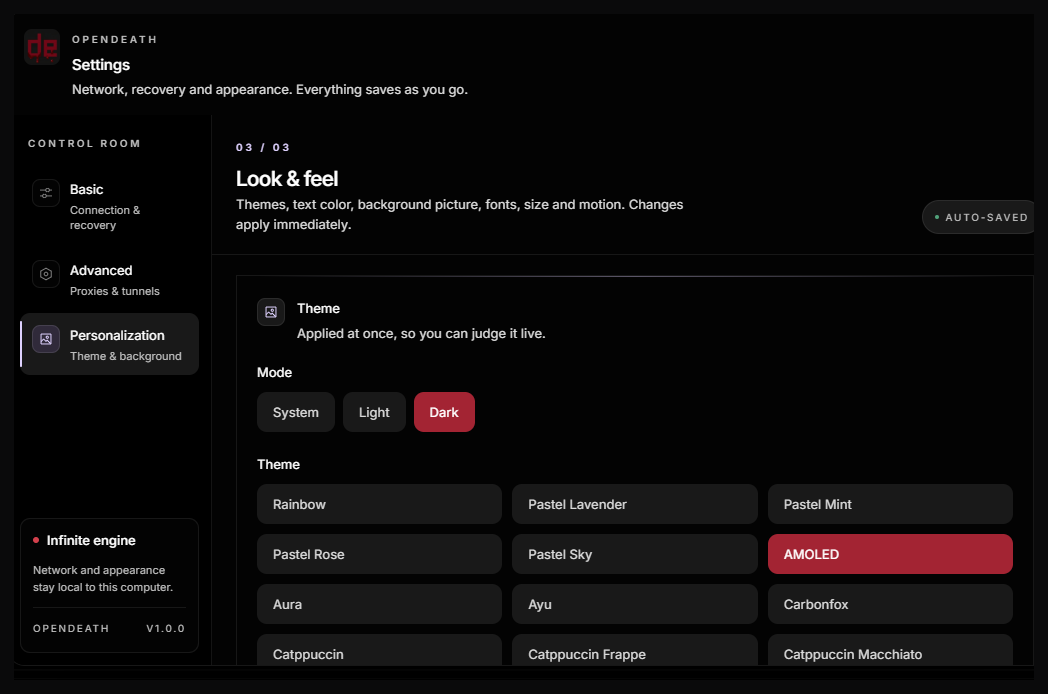
Dark by default, with light and system themes, custom backgrounds, rainbow accents, and a text color that stays readable.
Basic, Advanced, and Personalization tabs replace the wall of settings with three clear groups.
A per-user setup wizard or a single portable executable. Both run the same build and keep their data in the same place.
Checks for OpenCode Desktop, offers official VPN packages, creates shortcuts, and registers an uninstaller.
A single executable that extracts to a temporary folder. No shortcuts, no registry entry, no installer.
The OpenCode engine ships inside the app. You do not need a separate CLI install.
Tor Expert Bundle 16.0.1 is included and verified before packaging.
Desktop and Start menu shortcuts launch opendeath.exe, never the OpenCode window.
The uninstaller removes the app and shortcuts but keeps your settings and waiting chats.
A shorter list, and an important one. OpenDeath is deliberately not an account, not a cloud, and not a background updater.